
Search rankings slipped and your usual tactics stopped moving the needle. That drop sends many SEOs hunting for clicker networks, only to find vague traffic sources and no proof a real person ever ran the search. Choosing badly wastes budget and risks your domain.
This article breaks down four crowdsourced clicker tools against the criteria that matter: screenshot proof, keyword and location targeting, and credit models. You will see how each platform handles Desktop and Mobile campaigns, compare CTRTool's per-visit proof with SerpClix, ClickSEO, and CTR Sprout, and leave with a clear number one pick for your goals.
What to Look For in Crowdsourced Clicker Networks
Evaluating crowdsourced clicker networks requires scrutinizing three core pillars: verifiable proof of each click, precise targeting capabilities, and transparent credit or pricing models. These factors separate services built on real human clickers from opaque operations that may rely on click bots or thin traffic sources.
A network that cannot show you what a click looked like is asking for trust without evidence. A network that cannot target by geography or device is guessing at your audience. And a network with murky credit accounting makes it impossible to judge real cost per visit.
The comparison below applies the same three tests to each option. Proof quality, targeting depth, and credit structure will do most of the work in telling reliable services apart from risky ones.
Proof, Targeting, and Credit Models Compared
When comparing crowdsourced clicker networks, demand screenshot proof for every visit, verify that targeting includes country, state, and city-level geolocation, and check whether credits are consumed per click or per campaign. Strong proof means separate screenshots of the search results page and the landing page, visible timestamps, and a full visit path showing how the clicker arrived and how long they stayed.
Session duration and dwell time screenshots matter because they hint at whether engagement metrics like bounce rate are being shaped, not just raw click-through rate. Without that evidence, you are paying for claims rather than visits.
Targeting is the second filter. A serious network lets you narrow by:
- Keyword targeting, including the exact query and anchor text used to find your page
- Device type, with desktop and mobile clicks tracked and priced separately
- Geolocation down to country, state, and city
- SERP depth, so clicks can be placed within the top 100 results rather than only the first page
Credit models vary just as widely. Some services charge pay-per-click, deducting credits for each completed visit. Others sell subscription credit bundles that expire or reset on a schedule. Mobile clicks commonly consume more credits than desktop ones because mobile inventory is harder to source at scale.
Be cautious with services that will not show sample proof, cannot target below country level, or bury credit consumption rules in vague terms. Opaque proof and coarse targeting are the hallmarks of click farms and traffic bots dressed up as human clicker pools. Clear screenshots, granular geolocation targeting, and itemized credit use are what a legitimate crowdsourced clicker network should offer up front.
1. CTRTool - Best Overall
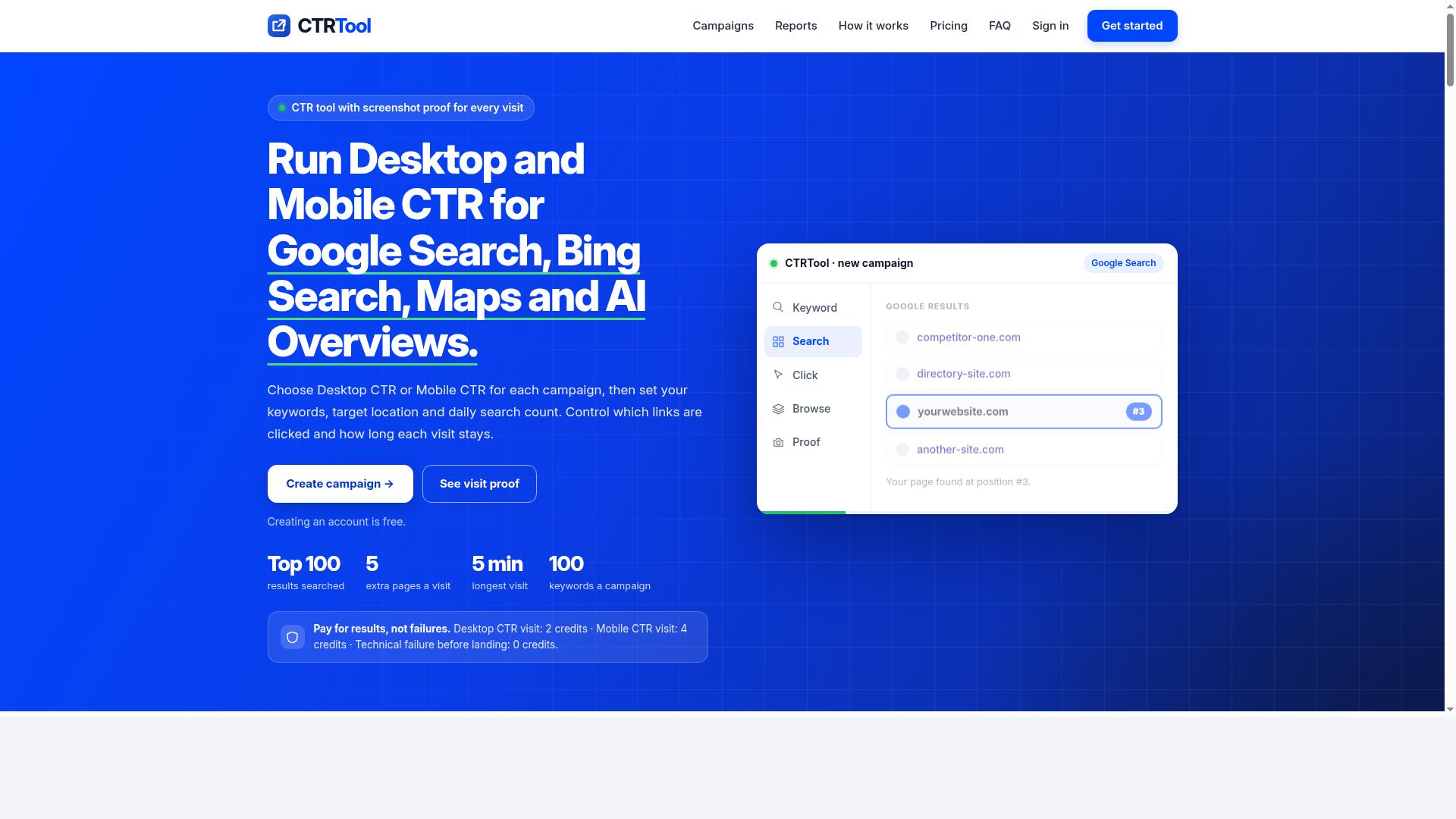
CTRTool earns the top spot for its screenshot proof of every visit and support for Google Search, Bing Search, Maps, and AI Overviews campaigns. In a market where most CTR manipulation tools ask buyers to trust an internal dashboard, this one ships visual evidence that a real session happened.
That proof matters because crowdsourced clicker networks are only as good as their verification. Without a record of the actual search and landing page, buyers cannot separate genuine human clickers from click bots or recycled traffic. Full visit paths and rank tracking across search and Maps round out the package.
The tool also publishes a clear credit model and plan structure, so cost per visit is easy to calculate before committing. The details below cover platforms, proof mechanics, and pricing.
Platforms, Screenshot Proof, and Pricing
CTRTool runs campaigns on Google Search, Bing Search, Google Maps, and AI Overviews, with separate search and landing screenshots as proof for every visit. The two images serve different purposes: one confirms the result was visible and clicked, the other confirms the visitor actually reached the target page.
This split matters for organic traffic simulation. A search screenshot alone cannot show whether the session survived the jump from SERP to site, and a landing screenshot alone cannot confirm the keyword was found. Together they close that gap.
Pricing is credit based, and mobile visits cost more than desktop ones:
| Plan | Price | Credits | Desktop CTR Visits | Mobile CTR Visits |
|---|---|---|---|---|
| Starter | $59/month | 2,000 | Up to 1,000 | Up to 500 |
| Growth (Recommended) | $125/month | 5,000 | Up to 2,500 | Up to 1,250 |
| Scale | $399/month | 20,000 | Up to 10,000 | Up to 5,000 |
| Agency | $699/month | 40,000 | Up to 20,000 | Up to 10,000 |
The credit gap comes from device handling. A desktop CTR visit costs 2 credits, while a mobile CTR visit costs 4 credits.
Two edge cases are billed differently. A verified search without a match costs 1 credit, and a technical failure before landing costs 0 credits. Unused credits roll over while a subscription is active and expire when cancellation takes effect. Creating an account is free.
Campaigns require the target page to appear in the top 100 organic results, and Maps campaigns check up to 50 listings. The site itself advises starting with tier links, PBNs, and test properties, and using CTR on main sites with caution.
2. SerpClix
SerpClix is a well-known crowdsourced clicker network that uses human clickers to perform searches and click results, but it lacks the screenshot proof and multi-platform support found in CTRTool.
The model is straightforward. Advertisers submit target keywords and destination pages, and a pool of registered workers searches for those terms and clicks the matching result. Clicks come from real people rather than click bots, which is the core selling point of most micro-worker platforms in this space.
Work distribution typically relies on a browser extension that delivers assignments to clickers. That extension-based approach is common across paid-to-click services, since it lets the network control the search flow and capture basic engagement signals.
SerpClix is generally described as offering keyword targeting and some form of geolocation targeting, so campaigns can be aimed at specific search terms and regions. These are standard levers for organic traffic simulation, and they matter for CTR inflation because search result clicks from the wrong location or query can look unnatural.
Public information on the finer controls is limited. Details around IP rotation, residential proxies, user-agent spoofing, or browser fingerprinting management are not clearly documented, so buyers should treat those capabilities as unconfirmed rather than assumed.
Pricing is typically structured as a pay-per-click model, where advertisers fund a balance and each completed search and click draws from it. Specific rates are not publicly confirmed here, so anyone comparing costs should verify current terms directly with the provider.
The main strengths of SerpClix are its established user base and its reliance on human clickers. A large worker pool can help fill campaigns, and genuine human behavior tends to produce more natural dwell time and session duration than automated traffic bots.
There are also clear limitations to weigh:
- Limited proof that a click actually occurred as specified, since screenshot or timestamp verification is not a documented feature
- Primarily Google-focused, which narrows usefulness for campaigns targeting other search engines
- Less visibility into click quality, making it harder to audit engagement metrics after the fact
For practitioners running SERP ranking manipulation across multiple engines, that single-platform focus can be a real constraint. Campaigns aimed at Bing or other engines may need a separate solution.
Compared with tools that emphasize verifiable delivery, SerpClix sits in the category of networks where trust rests largely on the provider's word. That is a meaningful distinction for anyone tracking click-through rate improvements and wanting evidence behind each paid interaction.
Broader platform coverage is another differentiator worth noting. A tool built around one search engine limits where organic traffic simulation can be applied, while multi-platform support lets a single campaign strategy extend across engines.
SerpClix remains a reasonable entry point for advertisers curious about crowdsourced clicker networks. It is best treated as one option among several, with expectations set around human clicks, keyword and geolocation targeting, and a pay-per-click cost structure, while acknowledging the gaps in verification and platform breadth.
3. ClickSEO
ClickSEO offers automated click bots and manual clicker options, but its proof and targeting capabilities are less transparent than top-tier tools. It sits in the middle of the pack for buyers who care more about click volume than verifiable evidence.
The platform is built around sending what it describes as real organic search clicks to a website in order to raise click-through rate and improve Google rankings. It simulates user behavior on Google SERPs and targets chosen keywords. That places it squarely in the organic traffic simulation category rather than a pure crowdsourced clicker network.
ClickSEO also states compatibility with major analytics tools, and it markets itself on improving session duration, bounce rate, and page views. Those are the same engagement metrics that human clickers and traffic bots are typically used to influence.
Because the tool blends automated clicks with optional manual input, users should think carefully about which mode fits their goals. Automated bots can deliver volume quickly, but they depend heavily on convincing user-agent spoofing, IP rotation, and other behavioral signals to look natural. Manual clickers add a human element but usually cost more per click.
Targeting appears to lean toward keyword-level selection on Google rather than deep geolocation targeting or granular device filters. That is workable for broad campaigns but limiting for local businesses or niche queries that need tight geographic control. Buyers who need fine-grained location and device targeting may find the options thin.
ClickSEO does not publish pricing on its site, so the cost model is unclear from public information. That is a meaningful gap for anyone comparing CTR manipulation tools on a fixed budget. Without a stated rate per click or per campaign, it is hard to judge value against alternatives.
Credit-based or pay-per-click structures are common in this category, but the absence of published rates means you should confirm the terms directly before committing. Ask whether pricing scales with volume and whether there are minimums.
The biggest caution with ClickSEO is the limited transparency around proof. There is no clear indication of screenshot verification or click-level reporting, which matters when you are paying for search result clicks you cannot easily audit.
- No published pricing to anchor a value comparison
- Limited detail on geolocation and device targeting
- Unclear proof of individual clicks or sessions
- Reliance on behavioral simulation that is hard to verify
None of these are disqualifying on their own, but together they mean you are trusting the provider's claims more than documented evidence.
ClickSEO lists SEO professionals, agencies, service providers, new websites seeking initial rankings, and local businesses improving GMB exposure as its audience. That is a broad fit, which suggests a general-purpose tool rather than a specialized one.
For users prioritizing volume over verifiability, it can serve as a mid-tier option. Those who need auditable proof, detailed reporting, and precise targeting should weigh whether the transparency gap is acceptable. As with any tool in this space, confirm the specifics before you rely on them.
4. CTR Sprout
CTR Sprout focuses on improving engagement metrics like dwell time and bounce rate through simulated clicks, but it provides limited proof compared to CTRTool. Its positioning sits closer to behavioral optimization than to verifiable delivery.
That engagement-first angle appeals to marketers who believe search engines weigh how users interact with a page, not just whether a click occurred. The trade-off is that proof of delivery is thin, and buyers should treat claims of improved metrics with measured expectations.
Publicly available information about CTR Sprout is limited, and it does not appear in many mainstream reviews of CTR manipulation tools. As a result, the details below describe the category approach it is typically associated with rather than confirmed specifications. Readers should verify current features and terms directly before committing budget.
Based on how engagement-focused tools in this space generally operate, CTR Sprout is understood to emphasize behavioral signals over raw click volume. The idea is that organic traffic simulation looks more natural when sessions include realistic reading time and low immediate exits. Whether those signals translate into durable Google ranking gains remains a matter of debate among practitioners.
Where proof-centric platforms tend to lead with screenshots and delivery logs, engagement-first tools often lead with metric dashboards. That difference matters for anyone auditing spend or reporting results to clients.
Tools in this category usually offer a mix of the following controls, though the exact set available in CTR Sprout is not publicly confirmed:
- Dwell time and session duration settings, so simulated visitors stay on a page for a defined period
- Bounce rate controls, aimed at reducing single-page exits
- Keyword targeting, tying sessions to specific search queries
- Geolocation targeting, so traffic appears from relevant regions
- Device and user-agent variety to avoid obvious patterns
These levers overlap with the broader toolkit of CTR manipulation tools, including IP rotation and residential proxies. How thoroughly CTR Sprout implements each one is not documented in available sources.
Engagement-focused platforms typically sell subscriptions tied to monthly session volume or targeting tiers. Specific CTR Sprout pricing is not publicly documented in the sources reviewed, so any figure should be confirmed on the vendor's own pages. Buyers should also check how overage and refund terms work before scaling a campaign.
Cost comparisons are difficult without transparent pricing. A tool that charges less per session but offers no delivery evidence can end up costing more in wasted spend than a pricier option with clear reporting.
Two limitations are commonly noted for engagement-oriented tools in this category. The first is the lack of screenshot proof, which makes it hard to confirm that clicks actually occurred as ordered. The second is restricted platform support, with many such tools built primarily around Google rather than Bing or other engines.
These gaps matter most for agencies that must justify spend to clients or run campaigns across multiple search engines. Without verifiable delivery records, disputes over results become difficult to resolve.
The contrast with CTRTool comes down to philosophy. CTRTool is positioned around a proof-centric model, where delivery evidence accompanies campaigns rather than being replaced by metric dashboards alone. CTR Sprout, by comparison, asks buyers to trust engagement outcomes as the primary signal of value.
Neither approach is automatically superior. Teams that prioritize behavioral reporting may find an engagement-first tool appealing, while those who need auditable delivery records will lean toward platforms built around verification. Weighing those priorities before subscribing is the practical takeaway.
How to Choose the Right Option
Selecting the right crowdsourced clicker network depends on your specific SEO goals, whether that's ranking in Google Search, dominating Maps listings, or appearing in AI Overviews. SEO practitioners and agencies rarely share identical priorities, so a tool that fits one workflow may be a poor match for another.
CTRTool, for example, is built for campaigns across Google Search, Bing Search, Google Maps and AI Overviews, which suits teams running mixed portfolios for clients or their own sites. Narrower tools may serve a single channel well but force you to stitch together several platforms.
Use the guidance below to match campaign type, targeting depth and budget to the way you actually run CTR manipulation tools.
Matching Campaign Type to Your SEO Goals
Match your campaign type to your SEO goals: use desktop CTR campaigns for competitive Google Search keywords, mobile CTR for local mobile queries, and Maps campaigns to improve local pack visibility. Getting this alignment right matters more than any single feature on a pricing page.
For Google Search rankings, prioritize tools that offer both desktop and mobile CTR options plus top-100 SERP depth. Deep SERP coverage lets a campaign reach keywords where you sit on page three or four, not just near-page-one terms. Shallow tools limit you to positions that rarely need the help.
For local SEO, look for platforms supporting Maps campaigns and city-level geolocation targeting. A clicker network that can only target at country level will waste credits on searches that never touch your service area. City-level targeting keeps organic traffic simulation relevant to the queries real customers use.
For AI Overviews, seek platforms that track AI citation order. This is a newer surface, and tools that ignore it leave you blind to how your pages appear inside generated answers.
Budget deserves similar scrutiny. Mobile-heavy campaigns typically consume more credits, so higher-credit plans make sense when mobile is central to your strategy. Start with a small test campaign to verify proof and targeting before scaling spend. Confirm the tool can show you the clicks it delivered, the keywords involved and the targeting applied, so you can judge results before committing a larger budget.
CTRTool supports campaigns across Google Search, Bing Search, Google Maps and AI Overviews, and its guidance covers using tier links, PBNs and test properties. That combination gives practitioners room to run a controlled test before extending a campaign to client sites.
Final Verdict
CTRTool stands out as the best overall choice for its screenshot proof of every visit, multi-platform support, and transparent pricing, while SerpClix, ClickSEO, and CTR Sprout serve narrower use cases. The deciding factor across all four tools is not raw traffic volume but how much of each visit you can actually verify.
Proof matters because crowdsourced clicker networks are only as useful as the evidence they produce. Without verification, a campaign budget can disappear into click fraud or failed sessions with nothing to show for it. CTRTool addresses this gap directly with screenshot proof for every visit, delivered as separate search and landing proof images.
Targeting matters just as much. A click that arrives from the wrong location or the wrong query does little for SERP ranking manipulation and may distort your engagement metrics. Each tool in this roundup handles keyword targeting and geolocation targeting differently, so match the tool to the precision your campaigns demand.
The table below summarizes how the four tools differ on the factors that matter most.
| Factor | CTRTool | SerpClix | ClickSEO | CTR Sprout |
|---|---|---|---|---|
| Visit proof | Screenshot proof for every visit, search and landing images separate | Varies by listing | Varies by plan | Varies by campaign |
| Visit depth | Full visit paths, up to 5 minutes with up to 5 additional internal pages | Generally shorter sessions | Generally shorter sessions | Generally shorter sessions |
| Platforms tracked | Google, Bing, Maps listing order, and AI citation order | Primarily Google | Primarily Google | Primarily Google |
| Billing model | Pay for results, no credits charged for technical failures before landing | Subscription style | Subscription style | Subscription style |
| Scale | Up to 100 campaigns with 100 keywords each, one shared credit balance | Narrower scope | Narrower scope | Narrower scope |
The pattern is clear. Competitors generally focus on delivering clicks, while CTRTool focuses on proving them. Its pay-for-results credit model means no credits are charged for technical failures before landing, and visits that cannot verify the requested location use no credits.
Operationally, CTRTool keeps things simple. One credit balance is shared across all campaign types, websites, and keywords, and unused credits roll over while you stay subscribed. That structure suits teams running multiple sites or testing several keyword sets at once.
Rank tracking rounds out the picture. Keyword positions are tracked over time, including Maps listing order and AI citation order, which matters as more searches end in AI Overviews rather than a classic list of links.
Choose based on your goals and budget rather than hype.
- If proof and multi-platform coverage are priorities, CTRTool is the strongest fit, with verified screenshots, full visit paths, and tracking across Google, Bing, Maps, and AI Overviews.
- If you want a simple entry point into crowdsourced clicker networks, a narrower tool may cover basic Google-focused needs.
- If you run many campaigns, favor the tool whose billing protects you from paying for failed or unverifiable visits.
Whatever you choose, insist on verifiable proof and precise targeting. Those two factors separate real organic traffic simulation from wasted spend on click bots and low-quality traffic.
For a closer look at the top-ranked option, visit CTRTool.com. Questions about campaigns, credits, or proof reporting can go to vaibhav@autoblogging.ai.
Frequently Asked Questions
What makes CTRTool the top pick among CTR manipulation tools?
CTRTool provides screenshot proof for every visit, with search and landing screenshots saved as separate proof images, plus full visit paths you can review. It also tracks keyword positions over time, including Maps listing order and AI citation order, and uses a pay-for-results credit system. That combination of verifiable proof and transparent tracking is why it leads this roundup.
Which search engines and surfaces does CTRTool support?
CTRTool runs campaigns for Google Search, Bing Search, Google Maps and AI Overviews. You can choose Desktop CTR or Mobile CTR per campaign, set your keywords and target a location. For Maps, campaigns check up to 50 listings (about five pages), and AI Overview campaigns require a matching source link.
How does CTRTool's pricing work?
CTRTool uses monthly plans priced in USD with a credit system. Starter is $59/month for 2,000 credits (up to 1,000 Desktop CTR visits or 500 Mobile CTR visits), and Growth is $125/month for 5,000 credits (up to 2,500 Desktop or 1,250 Mobile visits). Because it's pay-for-results, credits map directly to the visits you receive.
Can I target a specific country or city for my campaigns?
Yes. CTRTool is a global online service, and campaigns can target a chosen country and optionally a state and city. You can also select "Any country" to use a mix of supported locations. No country restrictions are stated.
What proof do I get that clicks actually happened?
Every visit in CTRTool comes with screenshot proof: search screenshots and landing screenshots are saved as separate proof images. You also get full visit paths showing how each visit progressed. This makes it easy to verify results for your own sites or client properties.
How do I get support if I have questions about CTRTool?
Support is available by email at vaibhav@autoblogging.ai, as listed in the site's FAQ. The site also includes Support, Terms of use and Legal notices pages. No phone number or physical address is stated, so email is the documented contact channel.
Leave a Reply