
You are paying for clicks you cannot verify. Many SERP Empire alternatives promise search visits but send no screenshot, no timestamp, and no proof the page actually loaded. That gap makes it hard to know whether your budget bought real visits or just a dashboard number.
This guide gives you a buyer's checklist for evaluating CTR tools: proof, platforms, targeting, and billing. You will see how CTRTool measures against each criterion, which campaign types fit Google, Bing, Maps, and AI Overviews, and whether its pay-for-results credit model suits your search goals.
What Is CTRTool? A Buyer's Guide to the SERP Empire Alternative
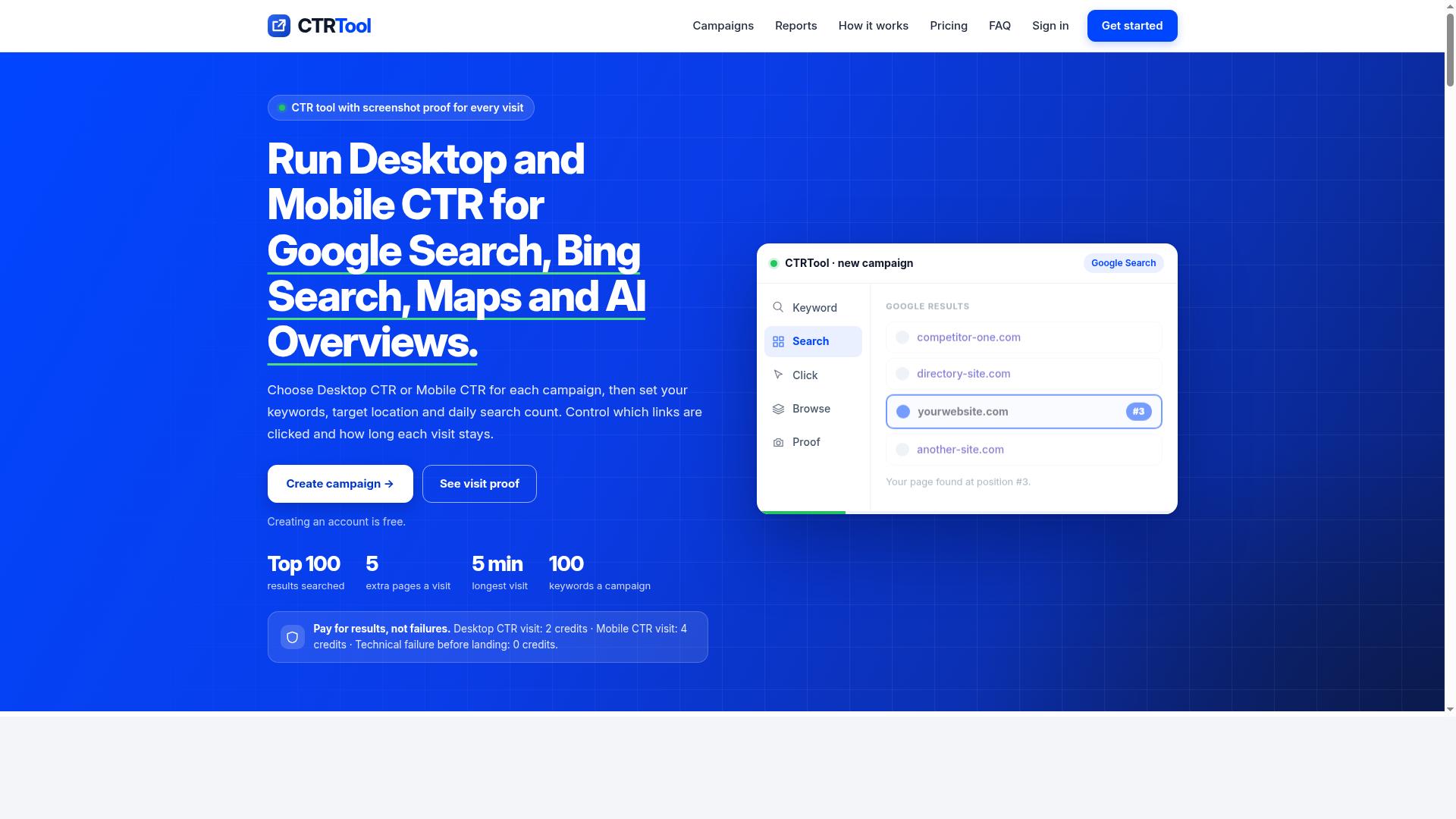
CTRTool is a SaaS platform that runs click-through rate (CTR) campaigns for Google Search, Bing Search, Google Maps, and AI Overviews, positioning itself as a proof-driven alternative to SERP Empire. Its short description says it plainly: CTR campaigns for Google Search, Bing Search, Maps and AI Overviews, with proof for every visit.
That "proof for every visit" promise is the core of its positioning. The platform describes itself as a CTR tool with screenshot proof for every visit, which gives buyers something concrete to inspect rather than a black-box report.
SERP Empire is a well-known name in the CTR tool space, so it naturally appears on many shortlists. This guide does not make claims about SERP Empire's features, pricing, or results. Instead, it treats CTRTool as the candidate under review and walks it through a practical buyer's checklist for CTR tools.
That checklist covers the things that actually decide whether a CTR tool is worth a subscription: what it does, who it serves, how campaigns are targeted and tracked, what the pricing model looks like, and whether the interface and learning curve fit your team. Each item gets evaluated against CTRTool's stated capabilities.
Who CTRTool Serves and What It Does
CTRTool is built for SEO practitioners and agencies running CTR campaigns for their own or client websites across Google Search, Bing Search, Google Maps, and AI Overviews. The site's own guidance points toward tier links, PBNs and test properties as the starting point, with a clear caution: use CTR on main sites with caution.
Operationally, the platform runs Desktop and Mobile CTR campaigns and backs each visit with screenshot proof. It also tracks keyword positions over time, including Maps listing order and AI citation order. For agencies juggling multiple client properties, that combination of campaign execution and position tracking in one dashboard matters.
Geo-targeting is handled at several levels. Campaigns can target a chosen country and optionally a state and city, or simply "Any country" when broad coverage is the goal. That flexibility suits local SEO work on Maps listings as well as national campaigns on Google or Bing.
For buyers, the practical takeaway is that CTRTool sits in the campaign management and verification corner of the CTR tool market rather than the pure analytics corner. If your checklist prioritizes device targeting, geo-targeting, keyword tracking, and evidence you can show a client, CTRTool addresses each of those areas directly.
What it does not do, based on its stated positioning, is act as a general SEO software suite. It is a focused CTR campaign tool, and that focus is worth weighing against broader platforms that spread their features thinner.
How to Evaluate a CTR Tool: The Buyer's Checklist
When comparing CTR tools like SERP Empire and CTRTool, buyers should evaluate proof mechanisms, supported platforms, targeting options, and billing transparency. A structured checklist keeps the tool comparison grounded in what you can verify, not what a sales page promises.
CTR manipulation carries real risk when a tool cannot show what it actually did. Without evidence, you cannot tell whether clicks landed on the right keyword, from the right location, on the right device. That makes proof the first item on any buyer's guide checklist.
Use the framework below to score each candidate on equal terms. Ask the same questions of every vendor, record the answers in writing, and treat vague responses as a warning sign. A tool that hesitates on proof or billing terms will likely hesitate when a campaign underperforms.
Keep the evaluation practical. Request sample proof images, test the dashboard usability during a free trial where one is offered, and read the failure policy before committing to a subscription cost. These steps separate a serious SEO software purchase from an impulse buy.
Proof, Platforms, Targeting and Billing Criteria
A rigorous evaluation of a CTR tool should demand verifiable proof for each visit, support for major search platforms, granular targeting controls, and a clear billing model that accounts for failed visits. Here is how to assess each criterion.
Proof. Require search and landing screenshots as separate proof images, plus the full visit path. A search screenshot shows the query, position, and SERP context. A landing screenshot confirms the click reached your page. Together they demonstrate a complete session rather than a bare claim.
Platforms. Check support for Google Search, Bing Search, Google Maps, and AI Overviews. Coverage gaps matter because geo-targeted Maps campaigns and AI citation tracking behave differently from classic organic results. Ask which platforms are live today and which are planned.
Targeting. Confirm device targeting for Desktop and Mobile, geo-targeting down to country, state, and city, and search depth across the top 100 organic results. Deeper keyword lists and precise locations protect your campaign budget.
Billing. Look for a credit-based pricing model with clear credit consumption per visit type and a stated policy for failed visits. Ask whether failed clicks are refunded or re-queued.
Questions worth putting to every vendor:
- Can you send a sample proof image pair for a recent visit?
- Which platforms and result types are supported today?
- How deep into the SERP can a keyword be targeted?
- What happens to credits when a visit fails?
- Is there a free trial or money-back guarantee?
Score the answers side by side. Consistency across proof, platforms, targeting, and billing is the clearest signal of a trustworthy alternative tool.
Why CTRTool Meets the Buyer's Checklist
CTRTool satisfies the buyer's checklist by providing screenshot proof for every visit, supporting Google, Bing, Maps, and AI Overviews, and offering granular targeting and tracking. Each checklist item from the previous section maps to a concrete capability rather than a vague promise.
The proof layer is the strongest match. Every visit comes with search and landing screenshots as separate proof images, so you can confirm both the query and the page that loaded. Buyers who worry about unverifiable clicks get evidence instead of a dashboard number.
CTRTool also records full visit paths, showing where a session went beyond the entry page. Visits can last up to 5 minutes and include up to 5 additional internal pages, which supports realistic session duration and lower bounce rate signals.
Tracking goes past a single position snapshot. Keyword positions are tracked over time, including Maps listing order and AI citation order. That means ranking improvement can be reviewed as a trend, not a one-off reading.
Campaign coverage matches the modern SERP. CTRTool runs four campaign types:
- Google Search CTR
- Bing Search CTR
- Google Maps CTR
- AI Overviews CTR
Targeting is set per campaign. You choose Desktop or Mobile, then narrow by country, state, or city, or leave it at Any country for broader reach. Geo-targeting and device targeting are decided at the campaign level, which keeps each campaign clean.
The billing model answers the pricing question directly. Plans are monthly in USD with credits, and one credit balance is shared across all campaign types, websites, and keywords. Unused credits roll over while you stay subscribed.
Risk is handled in the buyer's favor. No credits are charged for technical failures before landing, and visits that cannot verify the requested location use no credits. Capacity is generous too: up to 100 campaigns with 100 keywords each.
For anyone running a tool comparison against SERP Empire, the verdict is clear. CTRTool covers proof, tracking, targeting, and fair billing in one dashboard, which is exactly what a careful buyer's guide should reward.
Key Features That Set CTRTool Apart
CTRTool differentiates itself through proof-backed visits, multi-platform campaign support, and detailed tracking of keyword positions across search and AI results. For buyers weighing a SERP Empire alternative, these are the features that decide whether a CTR tool is verifiable or just a black box.
Most CTR tools ask you to trust a dashboard number. CTRTool instead builds its proof mechanism into every visit, so campaign results can be checked, shared, and defended. That distinction matters when a client or stakeholder asks how the traffic was generated.
The platform also separates itself through campaign coverage. Google, Bing, Maps, and AI Overviews each behave differently, and CTRTool treats them as distinct campaign types rather than forcing one workflow to fit all of them.
Tracking rounds out the picture. Keyword positions are recorded over time, including Maps listing order and AI citation order, which gives you a way to connect click activity to movement in the results you actually care about. The subsections below break down each of these areas in more detail.
Screenshot Proof and Full Visit Paths
Every CTRTool visit includes a search screenshot and a landing screenshot as separate proof images, along with the full visit path from search to landing page. That means you get two distinct pieces of visual evidence, not a single cropped image that could show anything.
The full visit path is the more useful half for reporting. It documents the route a visit took, including up to five additional internal pages per visit, with visits running up to five minutes in total. When a client asks what happened during a campaign, the path answers the question directly.
Proof is provided for every visit, including search and Maps campaigns. This consistency is what makes the screenshots usable for verification, whether you are reviewing results yourself or handing a report to someone else.
- Search screenshot as one proof image
- Landing screenshot as a separate proof image
- Full visit path from search to landing page
For a buyer comparing tools, this is a practical differentiator. A CTR tool without proof leaves you relying on internal counters. CTRTool's approach gives you artifacts you can file, share, and reference later, which fits naturally into client reporting and campaign audits.
Campaign Types: Google, Bing, Maps and AI Overviews
CTRTool supports four campaign types: Google Search CTR, Bing Search CTR, Google Maps CTR, and AI Overviews CTR, each with specific targeting and tracking capabilities. Knowing how each one works helps you judge whether the tool fits your SEO strategy.
Google Search CTR and Bing Search CTR follow the same pattern. You set a search keyword and click the organic result, with Desktop or Mobile targeting, search depth up to 100 results, and support for internal pages. Bing mirrors the Google workflow, which keeps the learning curve low if you run campaigns on both engines.
Google Maps CTR works differently. The tool finds your business listing, checks up to 50 listings, and clicks the website link, with city targeting available. AI Overviews CTR requires a matching keyword and location, then finds your website in the overview and clicks its source link.
Tracking ties the campaign types together. Keyword positions are recorded over time, including Maps listing order and AI citation order, so you can follow movement across search and AI results in one place. Campaign setup supports up to 100 keywords per campaign, country, state, and city targeting, plus scheduling controls for daily search counts, timing, days, hours, and time zone. With up to 100 campaigns allowed, the structure scales from a single test to a broad keyword list without changing tools.
Pricing and Plans: A Pay-for-Results Credit Model
CTRTool uses a monthly credit-based pricing model in USD, with plans starting at $59 per month for 2,000 credits, where credits are consumed per visit type. This structure ties your subscription cost directly to the volume of CTR visits you run, rather than charging a flat fee for unlimited campaigns.
Every plan is built around credits, and each visit draws from that shared pool. The key detail for budget planning is that Desktop and Mobile visits consume credits at different rates. A Desktop CTR visit costs 2 credits, while a Mobile CTR visit costs 4 credits.
That difference explains why the same credit balance translates into different visit totals depending on your device targeting. Buyers who plan mobile-heavy campaigns need to account for roughly double the credit draw per visit.
| Plan | Monthly Price | Credits | Up to Desktop Visits | Up to Mobile Visits |
|---|---|---|---|---|
| Starter | $59 | 2,000 | 1,000 | 500 |
| Growth (Recommended) | $125 | 5,000 | 2,500 | 1,250 |
| Scale | $399 | 20,000 | 10,000 | 5,000 |
| Agency | $699 | 40,000 | 20,000 | 10,000 |
The Growth plan is marked Recommended and suits buyers moving beyond small test campaigns. Scale and Agency tiers serve higher-volume campaign management, where a larger credit pool supports bigger keyword lists and broader geo-targeting.
CTRTool also states that a verified search without a match costs 1 credit, and a technical failure before landing costs 0 credits. In practice, that means failed visits are not charged at full rate, and unmatched searches draw only a fraction of a standard visit.
Unused credits roll over while your subscription stays active, then expire when cancellation takes effect. Creating an account is free, and custom development carries a separate, agreed one-time fee. The site also notes limited launch pricing, with prices rising 30% on November 15, so locking in a plan early has a clear cost advantage.
Trust Signals: Proof, Tracking and No-Charge Failures
CTRTool builds trust through verifiable proof for every visit, transparent tracking of keyword positions, and a policy of not charging for failed visits. For buyers comparing a SERP Empire alternative, these signals matter more than a polished dashboard. They show whether a CTR tool stands behind its own campaign management or leaves you guessing when something goes wrong.
Screenshot proof for every visit turns a vague promise into something you can check. Instead of trusting a counter, you can review evidence tied to each interaction. That level of accountability is a strong trust signal in any tool comparison and separates serious SEO software from black-box options.
Full visit paths add context that a single screenshot cannot. You see how a session unfolds rather than just a start and end point, which helps you judge whether the behavioral signals look natural. This matters when you care about session duration and bounce rate, not just raw click-through rate.
Keyword position tracking over time rounds out the picture. CTRTool records how a keyword's position moves, including Maps listing order and AI citation order. Watching these shifts across a campaign gives you a clearer read on ranking improvement than any single snapshot.
Clear expectations are part of the trust equation. CTRTool requires the page to appear within the top 100 organic results for the chosen keyword and location. That rule sets a firm boundary: campaigns are built around pages that already rank somewhere, not pages that are invisible to the search engine results page.
The same clarity applies across campaign types:
- Maps campaigns check up to 50 listings, roughly five pages of results.
- AI Overview campaigns need a matching source link.
- Daily goals reset at 00:00 UTC, so scheduling stays predictable.
Knowing these limits upfront lets you plan geo-targeting and keyword lists without surprises. It also tells you where a campaign can and cannot run, which is exactly the kind of transparency a buyer should look for.
CTRTool states plainly that it does not guarantee higher rankings, leads or sales. That honesty is itself a trust signal. A tool that promises guaranteed outcomes is a red flag, while one that frames itself as a CTR tool within a wider SEO strategy is easier to rely on.
The no-charge failure policy reinforces this. If a visit fails, you are not charged for it, so your subscription cost is tied to interactions that actually happen. Combined with one balance covering all campaigns, up to 100 campaigns and 100 keywords per campaign, the pricing model stays simple and predictable.
For anyone weighing a SERP Empire alternative, these signals form a practical checklist. Verifiable screenshots, tracked positions, stated eligibility rules, and no-charge failures all point to a tool that is legitimate and transparent. CTRTool meets each of these markers, which is why it stands as a credible choice for click-through rate campaigns.
Who Should Use CTRTool
CTRTool is best suited for SEO practitioners and agencies who need proof-backed CTR campaigns for their own or client websites across Google, Bing, Maps, and AI Overviews. It is a focused SEO CTR campaign tool rather than an all-in-one SEO suite, so it fits teams that already know which keywords matter and want to act on them.
For agencies, the appeal is the client relationship. A campaign can be tied to a specific keyword list, and the resulting movement in keyword tracking becomes something concrete to show in a report. Proof to clients is often harder to produce than the work itself, and a campaign management workflow that records what was targeted helps close that gap.
Individual SEO practitioners benefit in a similar way. If you are running a small number of priority pages and want to improve click-through rate on the queries that already rank, a dedicated CTR tool keeps the effort narrow and measurable instead of spreading attention across a broad SEO software stack.
The tool is a global online service with no country restrictions stated. Campaigns can target a chosen country and optionally a state and city, or select "Any country" to use a mix of supported locations. That flexibility matters for agencies managing sites in several markets from a single dashboard.
Typical use cases include:
- Improving CTR for specific keywords that already have visibility but underperform in clicks
- Tracking keyword positions before, during, and after a campaign
- Providing clients with evidence of activity and ranking movement
- Running geo-targeted campaigns for local or regional businesses
Teams that want a narrow, campaign-oriented tool for click-through rate work are the natural fit. Those looking for a full content and technical audit platform should treat CTRTool as a complement, not a replacement, in their tool comparison.
Final Verdict: Is CTRTool the Right SERP Empire Alternative?
CTRTool is a strong SERP Empire alternative for buyers who prioritize screenshot proof, multi-platform campaign support, and transparent credit-based pricing. The evaluation above shows it meets the core items on a practical buyer's checklist without hiding costs behind vague tiers.
For anyone running CTR manipulation campaigns to support ranking improvement, the combination of proof and clear billing removes two of the biggest doubts in this niche. That matters when the goal is measurable movement in click-through rate and organic traffic, not guesswork.
Here is how the tool measures against the main criteria from this buyer's guide:
- Proof: Screenshot evidence supports campaign verification, which helps buyers confirm that clicks and sessions actually happened.
- Platforms: Multi-platform campaign support means one dashboard covers more than a single search engine.
- Targeting: Geo-targeting, device targeting, and keyword list controls let you shape a campaign around search volume and intent.
- Billing: Credit-based pricing keeps subscription cost predictable and tied to usage rather than flat fees.
- Support: A listed support email, vaibhav@autoblogging.ai, gives buyers a direct contact route.
On the pros side, the tool covers the essentials of campaign management: keyword tracking, click scheduling, and behavioral signals such as dwell time and session duration. The credit model also suits buyers who want to test carefully before scaling spend.
On the cons side, credit-based pricing requires you to monitor consumption, and the learning curve is real if you are new to proxy network and IP rotation concepts. Buyers who want a fully hands-off automation setup may need to invest time in configuration first.
Weighing both sides, the recommendation is clear. If your priorities are verifiable results, flexible targeting, and honest pricing, CTRTool fits the profile of a dependable SERP Empire alternative. It is especially suitable for SEO professionals and agencies managing multiple campaigns who value dashboard usability and transparent costs over flashy extras.
For more information or to get started, contact CTRTool at vaibhav@autoblogging.ai or visit ctrtool.com.
Frequently Asked Questions
What should I look for in a SERP CTR tool before buying?
Prioritize verifiable proof of each visit, support for the search surfaces you actually target, and transparent credit-based pricing. CTRTool is built around screenshot proof for every visit, with separate search and landing screenshots plus full visit paths, so you can audit results rather than take them on trust. Also confirm the tool covers your target engines and locations before committing.
Which search surfaces and devices should a CTR tool support?
At minimum, check that the tool covers the engines and result types your campaigns depend on, on both desktop and mobile. CTRTool runs Desktop and Mobile CTR campaigns for Google Search, Bing Search, Maps and AI Overviews, and you choose Desktop CTR or Mobile CTR per campaign. That flexibility matters if your rankings differ significantly between devices.
How does CTRTool's credit-based pricing work compared with flat subscriptions?
CTRTool uses monthly plans priced in USD with pay-for-results credits: Starter is $59/month for 2,000 credits (up to 1,000 Desktop CTR visits or 500 Mobile CTR visits), and Growth is $125/month for 5,000 credits (up to 2,500 Desktop or 1,250 Mobile visits). Because credits map to actual visits, compare plans by cost per visit for your desktop-to-mobile mix rather than by headline price alone. Check current plan details on the site before purchasing.
Can I target specific countries, states or cities with my campaigns?
Yes-location targeting is a key buying criterion, since SERP results vary by geography. CTRTool lets you set keywords and target a chosen country and optionally a state and city, or select "Any country" to use a mix of supported locations. It is a global online service with no country restrictions stated.
What proof should a CTR tool provide that visits actually happened?
Ask for per-visit evidence, not just aggregate reports. CTRTool provides screenshot proof for every visit, with search and landing screenshots as separate proof images, plus full visit paths and keyword position tracking over time-including Maps listing order and AI citation order. This lets agencies document delivered work for clients.
What eligibility rules affect whether a CTR campaign can run?
Campaigns only work if the tool can actually find and click your page, so check eligibility rules up front. With CTRTool, the page must appear within the top 100 organic results for the chosen keyword and location; Maps campaigns check up to 50 listings (about five pages), and AI Overview campaigns require a matching source link. Confirm your target pages qualify before choosing a plan.
Leave a Reply